Cart state transition matrix
This page defines the state transition model for snappycart.
It exists to support test design for contributors working on cart logic, provider behaviour, and UI interactions.
The goal is not to generate random test cases. The goal is to map the cart states, valid transitions, guarded transitions, derived value checks, and key visual behaviours in a structured way.
Why this matrix matters
snappycart behaviour is driven by more than one moving part:
- cart data state
- drawer UI state
- derived values such as
totalItemsandsubtotal
A single action can look correct in isolation and still break the contract when state transitions are considered as a whole.
State model
Cart data states
| ID | State | Description |
|---|---|---|
| C0 | Empty | No items in the cart |
| C1 | SingleLineQty1 | One line item with quantity equal to 1 |
| C2 | SingleLineQtyGT1 | One line item with quantity greater than 1 |
| C3 | MultiLine | More than one line item in the cart |
Drawer UI states
| ID | State | Description |
|---|---|---|
| D0 | DrawerClosed | Drawer is closed |
| D1 | DrawerOpen | Drawer is open |
Combined states
| ID | Combination | Description |
|---|---|---|
| S0 | D0 + C0 | Drawer closed, cart empty |
| S1 | D1 + C0 | Drawer open, cart empty |
| S2 | D0 + C1 | Drawer closed, one line item, quantity = 1 |
| S3 | D1 + C1 | Drawer open, one line item, quantity = 1 |
| S4 | D0 + C2 | Drawer closed, one line item, quantity > 1 |
| S5 | D1 + C2 | Drawer open, one line item, quantity > 1 |
| S6 | D0 + C3 | Drawer closed, multiple line items |
| S7 | D1 + C3 | Drawer open, multiple line items |
Core assumptions
These assumptions should be treated as the intended contract unless package behaviour changes deliberately:
- adding the same product merges by
product.id - increment increases quantity by one
- decrement reduces quantity by one
- decrement from one removes the line item
clear()empties the cart data- drawer visibility is controlled separately from cart data
- invalid quantity input should not create a broken cart state
Main valid transitions
| ID | From | Event | Guard | To | Expected result |
|---|---|---|---|---|---|
| T01 | S0 | INIT | Initial render | S0 | Empty cart, badge = 0, subtotal = 0 |
| T02 | S0 | OPEN_DRAWER | User clicks cart icon | S1 | Drawer becomes visible |
| T03 | S1 | CLOSE_DRAWER | Close action fired | S0 | Drawer becomes hidden |
| T04 | S0 | ADD_NEW_ITEM | Valid product | S2 | First line item added |
| T05 | S1 | ADD_NEW_ITEM | Valid product | S3 | First line item added, drawer remains open |
| T06 | S2 | ADD_SAME_ITEM | Same product.id | S4 | Quantity increases from 1 to more than 1 |
| T07 | S3 | ADD_SAME_ITEM | Same product.id | S5 | Quantity increases from 1 to more than 1 |
| T08 | S2 | ADD_DIFFERENT_ITEM | Different product.id | S6 | Second line item added |
| T09 | S3 | ADD_DIFFERENT_ITEM | Different product.id | S7 | Second line item added, drawer remains open |
| T10 | S4 | INCREMENT_EXISTING | Existing line item | S4 | Quantity increases, same cart shape |
| T11 | S5 | INCREMENT_EXISTING | Existing line item | S5 | Quantity increases, drawer remains open |
| T12 | S4 | DECREMENT_EXISTING | Quantity becomes 1 | S2 | Single line item remains with quantity 1 |
| T13 | S5 | DECREMENT_EXISTING | Quantity becomes 1 | S3 | Single line item remains with quantity 1 |
| T14 | S2 | REMOVE_LINE | Only line item removed | S0 | Cart becomes empty |
| T15 | S3 | REMOVE_LINE | Only line item removed | S1 | Cart becomes empty, drawer remains open |
| T16 | S4 | REMOVE_LINE | Only line item removed | S0 | Cart becomes empty |
| T17 | S5 | REMOVE_LINE | Only line item removed | S1 | Cart becomes empty, drawer remains open |
| T18 | S6 | OPEN_DRAWER | User clicks cart icon | S7 | Drawer becomes visible |
| T19 | S7 | CLOSE_DRAWER | Close action fired | S6 | Drawer becomes hidden |
| T20 | S6 | ADD_SAME_ITEM | Existing line item | S6 | Quantity increases, line count unchanged |
| T21 | S7 | ADD_SAME_ITEM | Existing line item | S7 | Quantity increases, line count unchanged |
| T22 | S6 | ADD_DIFFERENT_ITEM | New line item | S6 | Line count increases |
| T23 | S7 | ADD_DIFFERENT_ITEM | New line item | S7 | Line count increases, drawer remains open |
| T24 | S6 | REMOVE_NON_LAST_LINE | More than one line remains | S6 | One line removed, cart still multi-line |
| T25 | S7 | REMOVE_NON_LAST_LINE | More than one line remains | S7 | One line removed, cart still multi-line |
| T26 | S6 | REMOVE_LINE | One line remains with quantity 1 | S2 | Cart collapses to single-line qty 1 |
| T27 | S7 | REMOVE_LINE | One line remains with quantity 1 | S3 | Cart collapses to single-line qty 1 |
| T28 | S6 | REMOVE_LINE | One line remains with quantity > 1 | S4 | Cart collapses to single-line qty > 1 |
| T29 | S7 | REMOVE_LINE | One line remains with quantity > 1 | S5 | Cart collapses to single-line qty > 1 |
| T30 | S2 | CLEAR | Clear invoked | S0 | Cart becomes empty |
| T31 | S3 | CLEAR | Clear invoked | S1 | Cart becomes empty, drawer remains open |
| T32 | S4 | CLEAR | Clear invoked | S0 | Cart becomes empty |
| T33 | S5 | CLEAR | Clear invoked | S1 | Cart becomes empty, drawer remains open |
| T34 | S6 | CLEAR | Clear invoked | S0 | Cart becomes empty |
| T35 | S7 | CLEAR | Clear invoked | S1 | Cart becomes empty, drawer remains open |
Guarded and invalid transitions
| ID | From | Event | Expected result |
|---|---|---|---|
| N01 | S0 or S1 | REMOVE_LINE | No state change |
| N02 | S0 or S1 | INCREMENT_EXISTING | No state change |
| N03 | S0 or S1 | DECREMENT_EXISTING | No state change |
| N04 | S0 or S1 | CLEAR | No crash, state remains empty |
| N05 | S0 | CLOSE_DRAWER | No state change |
| N06 | S1 | OPEN_DRAWER | No state change |
| N07 | Any non-empty state | SET_QUANTITY(0) | Line item removed or request rejected, but no broken state |
| N08 | Any non-empty state | SET_QUANTITY(-1) | Request rejected or normalised safely |
| N09 | Any non-empty state | SET_QUANTITY(NaN) | Request rejected, no corrupted state |
| N10 | Any non-empty state | SET_QUANTITY(decimal) | Request rejected or normalised consistently |
| N11 | Any state | ADD_NEW_ITEM with invalid payload | Request rejected, no corrupted state |
| N12 | Any state | Rapid repeated actions | No broken totals, no duplicate inconsistent state |
Derived values matrix
Every mutating transition must validate more than the line items list.
| Event | Distinct lines | totalItems | subtotal | Badge | Empty state |
|---|---|---|---|---|---|
| Initial empty state | 0 | 0 | 0 | 0 | Visible when drawer is open |
| Add new item | Increases | Increases | Increases | Updates | Hidden |
| Add same item | Unchanged | Increases | Increases | Updates | Hidden |
| Add different item | Increases | Increases | Increases | Updates | Hidden |
| Increment | Unchanged | Increases by 1 | Increases | Updates | Hidden |
| Decrement | Unchanged or reduced | Decreases by 1 | Decreases | Updates | Visible only if cart becomes empty |
| Remove line | Decreases | Decreases | Decreases | Updates | Visible only if last line is removed |
| Clear | 0 | 0 | 0 | 0 | Visible when drawer is open |
What to validate after each transition
After every valid cart mutation, contributors should verify:
items.length- individual line item quantity
totalItemssubtotal- visible badge value
- empty state visibility
- drawer visibility state
- correct rendering of item names, prices, and controls when applicable
Visual state references
The screenshots below should show the stable visual outcome for the most important cart states.
S0 Cart Empty, Drawer Closed
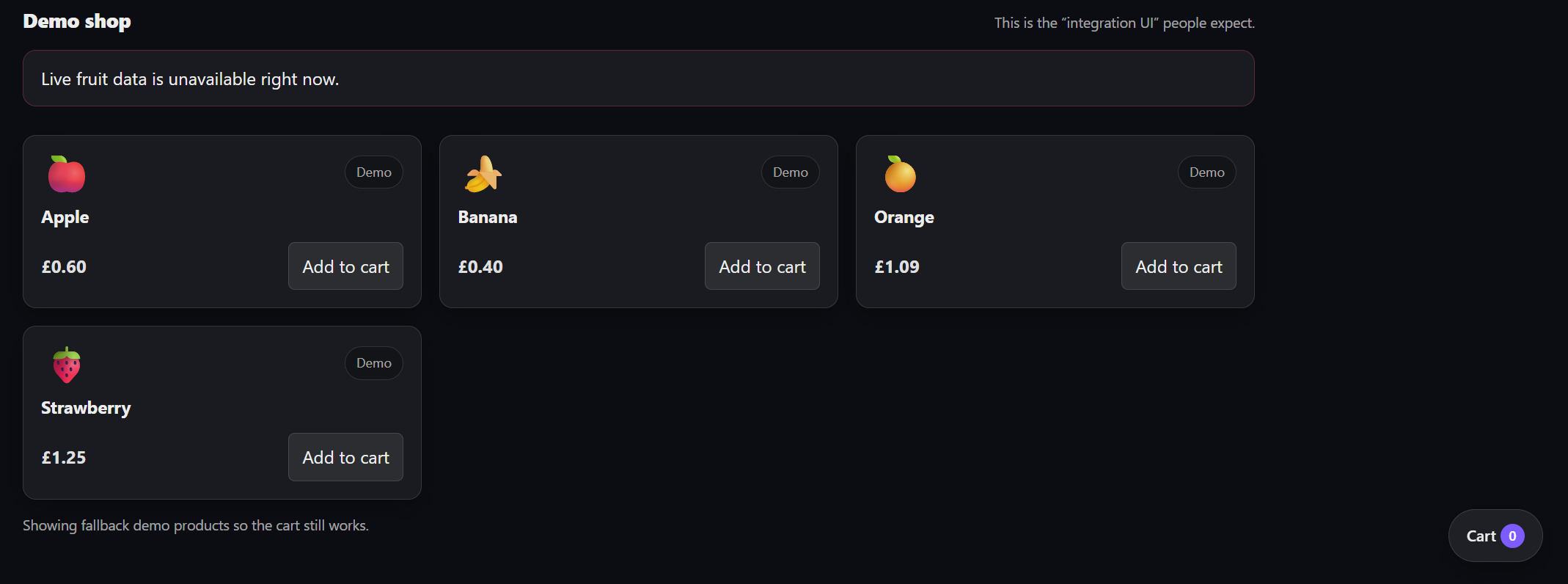
Purpose
- State S0: drawer closed, cart empty.
Start state
- Fresh page load, no items in cart.
What should be visible
- cart icon
- badge shows 0 if your demo shows empty badge, or no badge if hidden by design
- drawer is closed
Do not show
- open drawer
- any added item
S1 Cart Empty, Drawer Open
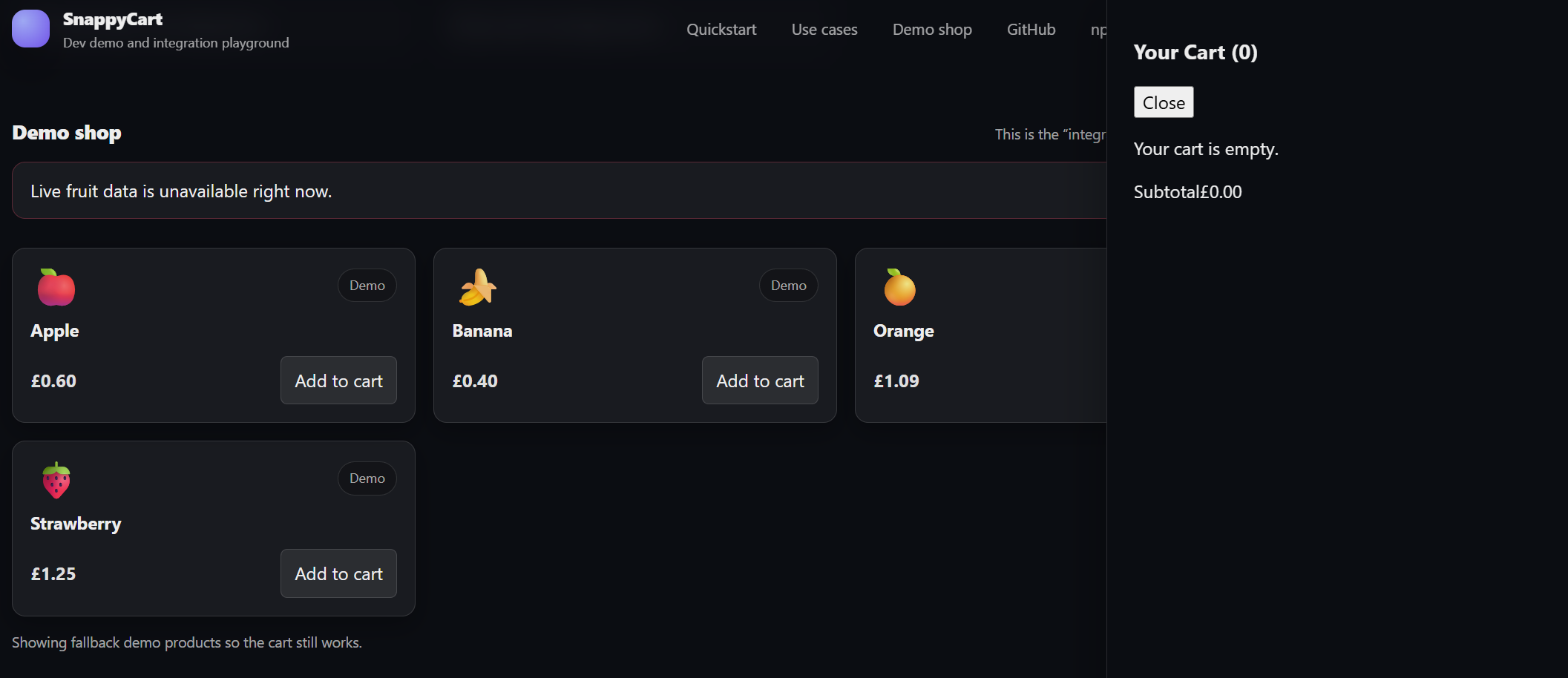
Purpose
- State S1: drawer open, cart empty.
Start state
- Fresh page load, empty cart.
Action
- click cart icon
What should be visible
- open drawer
- empty cart message
- subtotal at zero if shown
- no line items
Capture tip
- Make sure the empty state text is readable and centered properly.
S2 Single line item, quantity = 1
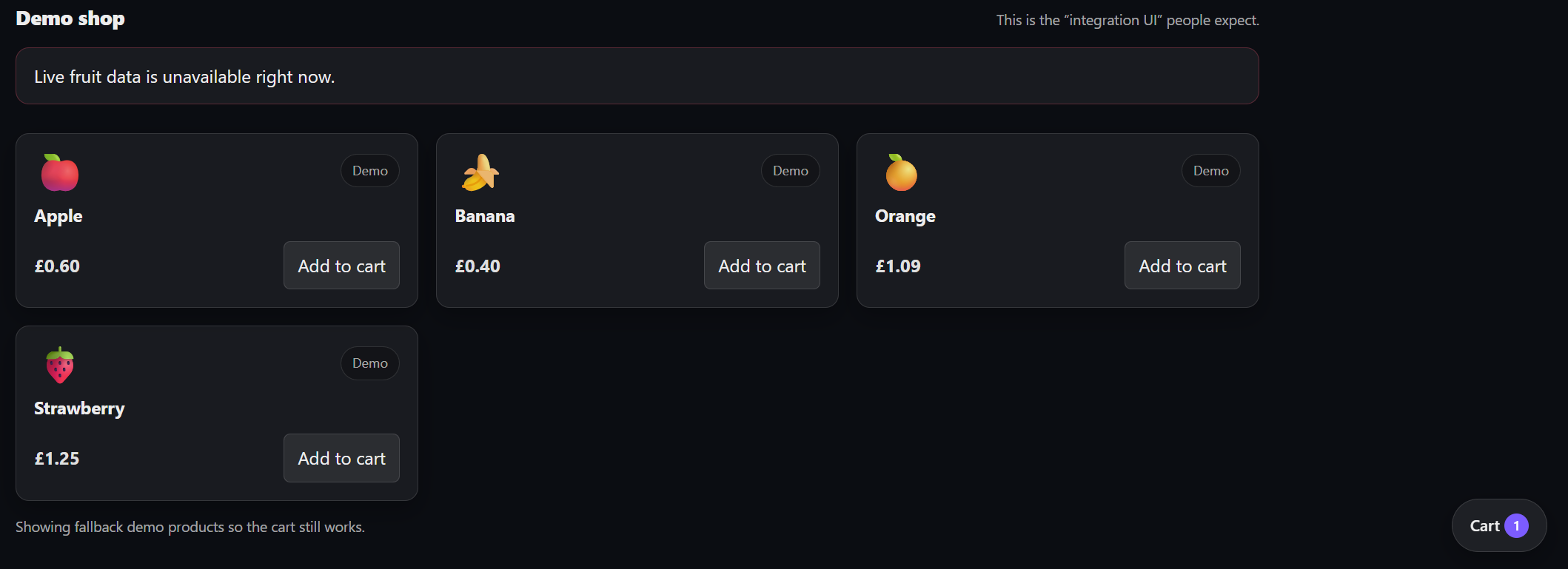
Purpose
- State S2: one line item, quantity = 1.
Start state
- empty cart
- drawer closed
Action
- add Apple once
- keep drawer closed if possible for this shot
What should be visible
- badge = 1
- drawer closed
- cart has one item in state, but only badge is visible externally
S4 Single line item, quantity > 1
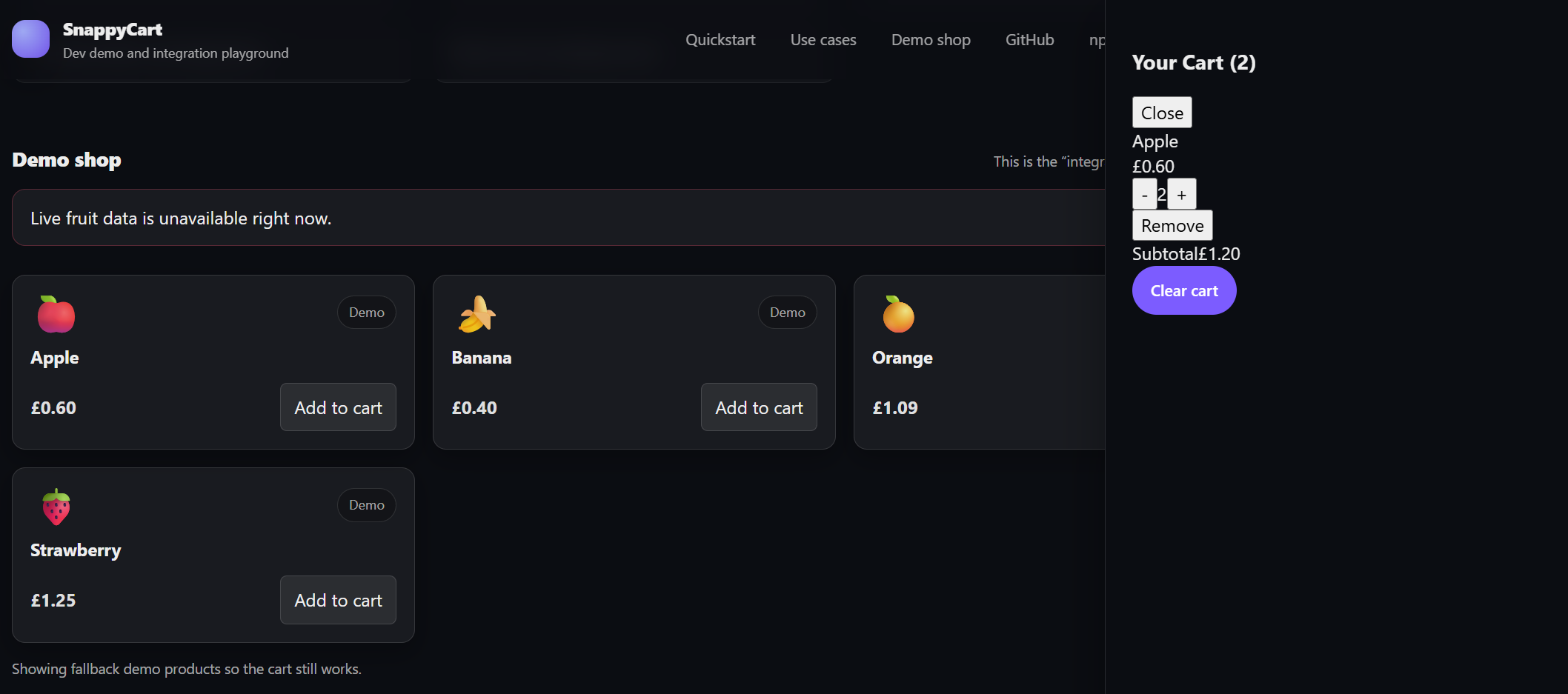
Purpose
- State S4: one line item, quantity greater than 1.
Start state
- Apple already in cart once
Action
- add Apple again or increment quantity to 2
- keep drawer open for readability if needed
What should be visible
- one line item only
- quantity displayed as 2
- subtotal = £1.20
- no duplicate Apple rows
Important
- This state should clearly prove that same-item add merges quantity instead of creating a second line.
S6 Multi-line cart, drawer closed
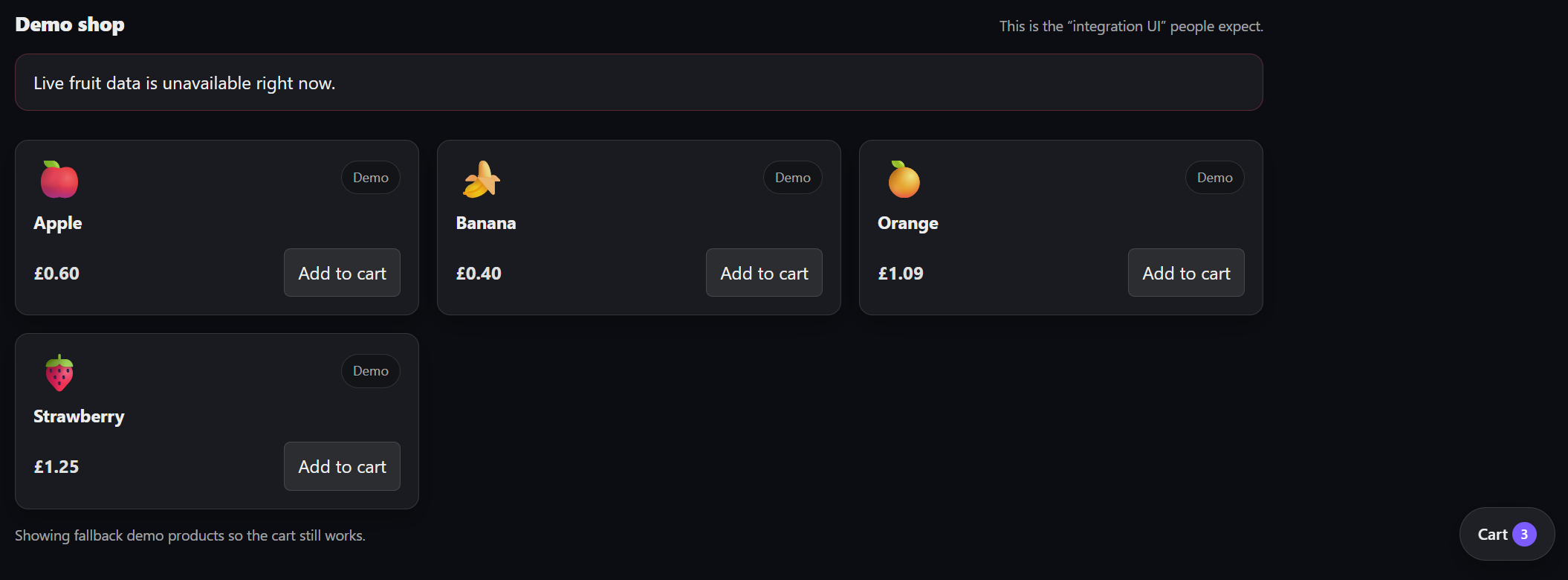
Purpose
- State S6: multi-line cart, drawer closed.
Start state
- Apple quantity = 2
- Banana not yet added
- drawer closed
Action
- add Banana once
- keep drawer closed
What should be visible
- badge = 3
- drawer closed
Optional
- If closed state does not visually communicate enough, just make sure the badge count is readable.
S7 Multi-line cart, drawer open
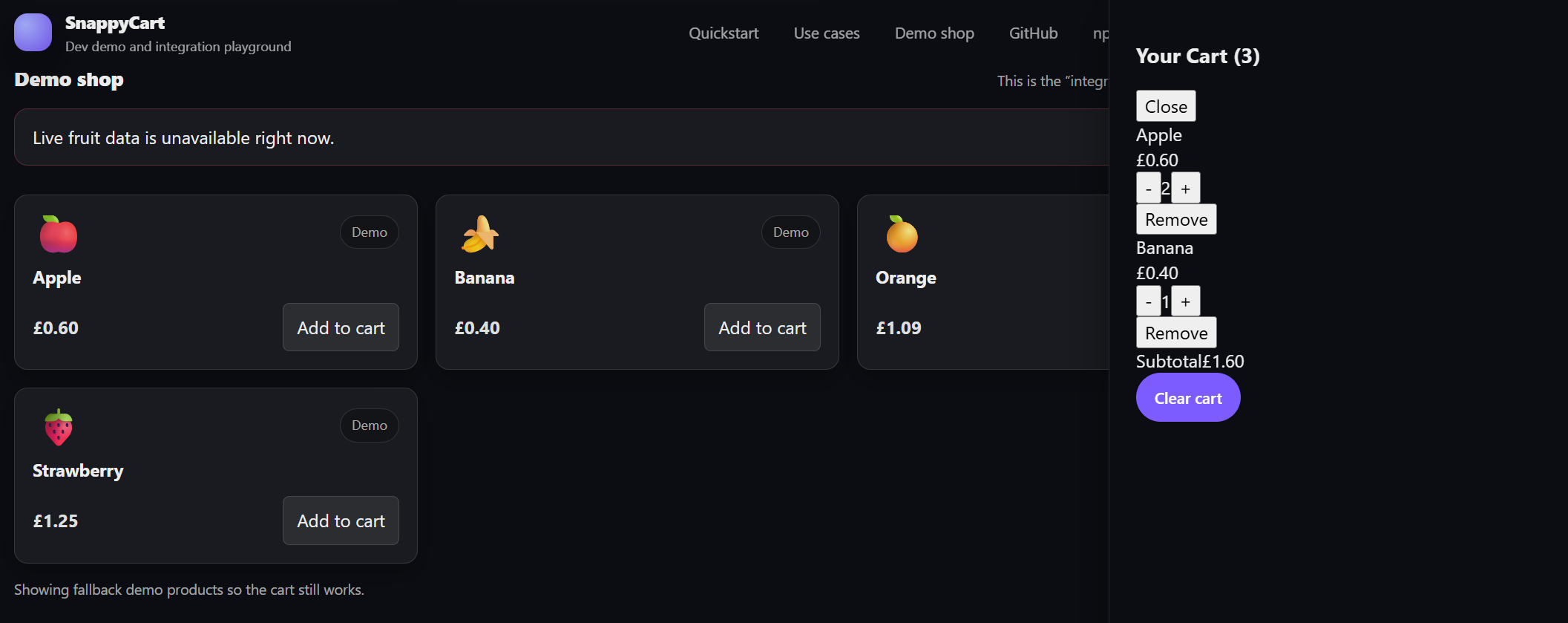
Purpose
- State S7: multi-line cart, drawer open.
Start state
- Apple quantity = 2
- Banana quantity = 1
Action
- open the drawer
What should be visible
- two line items
- Apple line with quantity 2
- Banana line with quantity 1
- subtotal = £1.60
- clear cart action visible if your UI supports it
Transition clips
The clips below should stay short and focused. Each one should show a single transition only.
T02 Open drawer
This clip shows the drawer opening from the empty closed state without mutating cart data.
Transition
- S0 -> S1
Start state
- empty cart
- drawer closed
Action
- click cart icon
- drawer opens
End state
- empty open drawer
Clip goal
- Show that opening the drawer changes UI state only and does not mutate cart contents.
T04 Add first item
This clip shows the cart moving from empty to a single line item state.
Transition
- S0 -> S2 or visually into open equivalent if your UI opens drawer
Start state
- empty cart
- drawer closed
Action
- click add-to-cart for Apple once
End state
- one item added
- badge updates to 1
Clip goal
- Show the first successful add.
Important
- If your host demo auto-opens the drawer on add, that is fine, but the clip still clearly shows the first-item transition.
T06 Add same item and merge quantity
This clip shows quantity increasing on an existing line item instead of creating a duplicate line.
Transition
- S2 -> S4
Start state
- Apple already in cart once
- drawer open if needed for visibility
Action
- click add Apple again or use increment on Apple
End state
- Apple remains a single line item
- quantity changes from 1 to 2
- subtotal updates
Clip goal
- Show merge-by-product-id behaviour, not duplicate-line behaviour.
T08 Add different item and create multi-line cart
This clip shows the cart transitioning from a single-line state to a multi-line state.
Transition
- S2 -> S6
Start state
- Apple quantity = 1
Action
- add Banana once
End state
- cart now has two distinct lines
Clip goal
- Show transition from single-line cart to multi-line cart.
T12 Decrement quantity back to one
This clip shows a single line item moving from quantity greater than one back to quantity equal to one.
Transition
- S4 -> S2
Start state
- Apple quantity = 2
- drawer open
Action
- click decrement once
End state
- Apple quantity becomes 1
- subtotal decreases correctly
Clip goal
- Show decrement above one without removing the line.
T14 Remove last line item
This clip shows the cart returning to the empty state after the last line item is removed.
Transition
- S2 -> S0 or S3 -> S1
Start state
- exactly one line item in cart
- quantity = 1
- drawer open is best for this clip
Action
- click decrement if quantity-1 removes line, or click remove button
End state
- cart becomes empty
- empty state appears
Clip goal
- Show last-line removal and return to empty cart.
T30 Clear cart
This clip shows the cart being cleared from a non-empty state.
Transition
- non-empty -> empty
Start state
- multi-line cart
- drawer open
- clear cart button visible
Action
- click clear cart
End state
- all items removed
- empty state visible
- subtotal reset to zero
Clip goal
- Show bulk reset behavior clearly.
Cross-matrix view
Cart data transitions
| From \ To | C0 Empty | C1 SingleQty1 | C2 SingleQtyGT1 | C3 MultiLine |
|---|---|---|---|---|
| C0 Empty | INIT, CLEAR(empty) | ADD_NEW_ITEM | Not direct | Not direct |
| C1 SingleQty1 | REMOVE_LAST, CLEAR | No-op or invalid actions | ADD_SAME, INCREMENT | ADD_DIFFERENT |
| C2 SingleQtyGT1 | REMOVE_LAST, CLEAR | DECREMENT to 1 | INCREMENT, SET_QUANTITY(n > 1) | ADD_DIFFERENT |
| C3 MultiLine | CLEAR, remove until empty | Remove until one line remains at qty 1 | Remove until one line remains at qty > 1 | Add, increment, remove non-last |
Drawer transitions
| From \ Event | OPEN_DRAWER | CLOSE_DRAWER | CART_MUTATION |
|---|---|---|---|
| D0 Closed | D1 | D0 | Should remain D0 unless host app changes it |
| D1 Open | D1 | D0 | Should remain D1 unless host app changes it |
Recommended coverage priority
P0
- add first item
- add same item
- add different item
- decrement from quantity greater than 1 to quantity equal to 1
- remove last line item
- clear the cart
- open and close the drawer without data corruption
P1
- invalid quantity handling
- invalid product payload handling
- subtotal recalculation
- stale action handling after clear
- repeated user clicks
P2
- keyboard close behaviour
- image fallback rendering
- host-controlled integration edge cases
Practical contributor notes
This matrix should guide:
- reducer unit tests
- provider and hook integration tests
- component tests for
CartDrawer - component tests for
CartIcon - demo end-to-end smoke coverage
It should not be treated as a requirement to write one test per row in the same layer.
The point is to make sure the contract is fully represented and covered at the right level.
Summary
snappycart has two important state dimensions:
- cart data state
- drawer visibility state
The project also relies on derived values such as totalItems and subtotal.
That makes state transition testing a strong fit for the package.
This matrix gives contributors a complete model for reasoning about valid behaviour, invalid behaviour, and risk-based test coverage.